Integrating AI into the Salesforce Marketing Cloud
Research and design to help marketers optimize their campaigns and reduce error rates.
Scope
Time: 5 months
Team: 5 UX designers, 1 UX Researcher
Mentors: 1 UX designer, 1 Design Manager @ Salesforce
Methods: In depth interviews, Secondary Research, Competitive Analysis
Tools: Dovetail, Figma
The project aimed to revolutionize the Salesforce Marketing Cloud by integrating artificial intelligence (AI). The primary goal was to empower marketers to create personalized, data-driven content that adheres to brand guidelines and accessibility standards, ultimately leading to more effective marketing campaigns.
Over the course of a semester, in collaboration with two designers from Salesforce, we conducted a comprehensive suite of research activities, including interviews with marketers, secondary research on AI in marketing and email accessibility, and a thorough competitor analysis. The insights gained from this research informed the development of "Einstein Email QA," an AI-powered tool to be seamlessly integrated within the Salesforce Marketing Cloud.
BACKGROUND
What does Salesforce do for Marketing?

Salesforce Marketing Cloud is a digital marketing automation platform that helps marketers design, execute, and personalize marketing campaigns

Salesforce's flagship AI - Einstein provides predictive and generative AI capabilities across the company's sales, service, marketing, and commerce products
DESIGN CHALLENGE
Find opportunities to integrate AI into the current Marketing Cloud experience
Our process of solving this challenge was split across 5 sprints, each sprint having a specific research and design focus. We did a total of 5 iterative sprints to reach the final solution.

SPRINT 1: DISCOVERY RESEARCH
Why would marketers need AI?
Our first step was to understand how marketers currently use the Marketing Cloud, and the pain points they have. To understand this, we conducted two research activities:
Secondary Research
Goal: Understand the space of marketing and AI
We conducted desk research on marketing processes, the role of AI, and competitors. One of our main learnings here were the different areas AI is currently integrated in marketing, and the technical feasibility on what it can do. From this, we identified a few opportunity areas:

Primary Research
Goal: Understand the current experience of marketers
We then conducted in depth interviews with marketers to understand their current pain points.
Participants
4
marketers
3
users of the Salesforce Marketing Platform
Participants were recruited online by posting in Salesforce and Marketing communities on Reddit and Linkedin
Our research indicated that marketers usually face challenges in these parts of the campaign process -
Questions
Their experiences with marketing workflows
Major pain points in their daily work
What parts are currently challenging or time consuming?
How is their current experience with the Salesforce Marketing Cloud?

Building customer journeys
Marketers are unable to clone campaigns, leading to added work in creating new ones

Data Integration and Reporting
While the platform effectively tracks email interactions, it cannot incorporate broader customer data seamlessly

Brand Validation and Quality Check
Identifying changes and making adjustments becomes tedious as it requires coordinating with many stakeholders

Integrating Social Media
Incorporating data from direct interactions on social platforms could provide a more comprehensive understanding of customer behaviors.
To understand our key opportunity areas we created a user journey map

SPRINT 2: INITIAL CONCEPTS
What do we build?
Based on our findings, we then conducted an ideation session, where we landed on 4 possible solution concepts. These were then presented to our mentors at Salesforce for feedback.
Concept 1: Sandbox for Experimentation
Research Findings
Currently, content experimentation happens on the platform with the marketer's strategy, intuitions, and data.
Concept
Building a Sandbox to test a customer
journey and simulate the campaign with set parameters.These insights could be used to build the campaign.

These concepts were then juxtaposed against our findings from the primary and secondary research. Based on this and the feedback from our mentors, the Email Quality Check (concept 2) was taken forward as it aligned with user pain points and the capabilities of AI.
SPRINT 3: FURTHER RESEARCH
How do we build a QA Checker?
We conducted 4 in-depth interviews and secondary research to understand how AI could help marketers in QA. From this, we found that:
68%
emails contain some text error

Accessibility Checking
Marketers are not trained specifically in accessibility, and making content accessible involves a lot of guess-work

Mail merge validation
Checking of errors in mail merge involves going through thousands of names, last names, and emails. There is not enough time to do this at the end of the campaign.
90%
emails have accessibility issues

Link Validation
Marketers found link checking to be tedious, and mentioned that they tend to miss it often.
Brand and design
Errors still slip in after rigorous branding guidelines. Fixing those issues need collaboration with multiple teams
56%
contain broken or wrong links
So what does a QA checker need?
- Our research showed us that
Based on these insights, we created our final concept in Phase 4
SPRINT 4 + 5: FINAL DESIGNS
Our Design Decisions
Over the next two sprints, we created and iterated designs into a final concept. Based on the research findings in the previous sprint, four features were created in the final concept.

Accessibility Checking
Findings
Some images lack alt text or have insucient descriptions, making it dicult for visually impaired users to understand the content.
Colors in the email do not provide enough contrast, which can be challenging for users with color vision deficiencies.
Design concept
The QA checker flags parts of the email that do not align with the accessibility.
Guidelines such as missing alt text, insucient color contrast, and header hierarchy discrepancies, and suggests ways to fix the errors.


Link Validation
Findings
Broken links in the email can frustrate end users and decrease click rates.
Broken unsubscribe links may lead to compliance issues, posing potential legal concerns for the organization.
Design concept
The link checker feature systematically scans all links within the emails to verify their functionality.
It identifies unsubscribe links that may pose compliance risks, allowing marketers to address these issues proactively

Brand Guidelines
Findings
Several collaborators such as designers and copywriters work on the creation of content assets for one email. This can lead to mismatches in adherence to brand guidelines.
Design concept
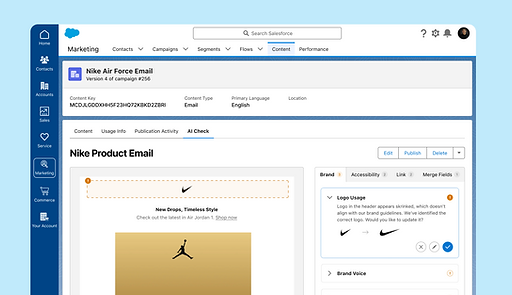
This feature uses brand guidelines and AI to ensure that the email marketers create represents the brand accurately in terms of brand voice, usage of assets such as logos, and other components such as buttons in the email content.


Mail merge errors
Findings
Emails can end up displaying the merge tags themselves (e.g., "Dear [First_Name],") if the data is missing or if a user has a middle name and a last email.
Design concept
AI conducts a comprehensive mail-merge test to identify potential formatting issues and data inconsistencies within merge fields.

RESEARCH IMPACT
What did I influence?
01
Laying the groundwork
In this collaboration with Salesforce, we were not able to access any internal research or information. Here, research was critical to understand the space of Marketing Cloud and Salesforce AI.
02
Prioritization
After our first design sprint, it was difficult to understand where to go next. Mapping our concepts back to research was important to identify the solution that would generate most value
03
Design details
While we were able to narrow down our concept, we still needed more research to understand how the concept needs to be designed.
LOOKING BACK
Reflections
If I had more time
Given more time, I wish we were able to do some usability testing on our designs. With limitations in time, we were only able to test our designs with our mentors.
Testing the designs with actual users would help us to understand how our designs fit into the current mental model of the users.
Advocating for research
I was the sole researcher on this project. The multiple sprints helped me realize how important it is to advocate for research at multiple stages of the project.